Monday, September 14, 2009

Hackintosh confessions

I love my Macbook Pro. I have the 2.53 GHz first generation unibody, which is a great machine. At the time I got it, November 2008, it was the smallest Macbook with a Firewire port that I'd be happy to use as a daily machine; this is important to me.

But it was too big, and expensive, to haul around when travelling for a day or three (longer than that, and I would have to take it). I needed a smaller machine for travelling around, one to check my e-mail, Skype back to home and browse. I didn't want an iPhone or an iPod Touch (my opinion on these devices is no secret), but didn't want to spend much more than R5k. Enter left-field, a netbook. These all follow the same pattern; Intel Atom N270 processor, small-ish disk (either regular or SSD, 1GB RAM and a 0.3MP webcam.

Good enough; now I needed to find one that ran Mac OS X. The winner at the time was the Dell Mini 9. I managed to get one with 2GB of RAM, a 64GB SSD and a built-in 3G modem. Bonus! Thanks to a very active and committed crowed at Mydellmini.Com, I have been running a Hackintosh since early December 2008.

I've upgraded from 10.5.6 to 10.5.8 (with 10.5.7 in between), and last week made it to 10.6 (and then 10.6.1), without a hitch. Other than deep sleep not working (which is in progress), everything is flawless, and I have a mini-Mac that meets my needs perfectly.

Thanks, Mydellmini.Com and Dell; you've solved my computer-travelling problems!

Snow Leopard upgrade

When it was rumoured that build 10A432 of Snow Leopard was indeed the golden master, I got very excited. Even though there were copies of 10A432 floating around, I resisted temptation and didn't install.

The primary reason was the potential transition from 10A432 to whatever the final build was; there was no guarantee that I would be able to upgrade. I would more than likely have to revert to 10.5.8, and then upgrade to the retail edition. Reluctantly, I waited until it hit retail, and I proceeded to install it onto my Macbook Pro; lo and behold, it was indeed build 10A432. Oh well, nothing lost except some geek cred. I did this on the 3rd of September 2009.

The upgrade was flawless; mostly everything worked, and the few things that didn't were resolved by the 10th of September. There are a few visible changes, but nothing earthshattering. The big improvement for me is in responsiveness (I haven't seen the beach ball) in ages), and the general overall snapiness.

A worthy upgrade indeed!

Friday, July 31, 2009

Component switcher


I have several devices that use the one component input on my old-school CRT TV. Thanks to my Logitech Harmony One universal remote (which IMO is the world's best universal remote), my AV receiver, TV and associated device power on and configure themselves correctly. What is a PITA is that I then have to get up, and change the input using a manual AV switcher to the relevant component device. This sucks.

So, from those thieves, I've ordered a Impact Acoustics 3-play switcher, which I can then program using my remote to change inputs. Now that should be cool!

PS. I tried the Zakspeed S-video / analog-audio / composite switcher, but it seems to interfere with a component signal. Kudos to them for accepting it back though.

PPS. Changing my TV might be a better option that all these hacks, but I'm not quite ready yet to drop R30k on an LED TV; besides, right now there are not that many options. I'll wait.

Dual eSATA backplate


I've been looking for a dual-eSATA PCI back plate for a server, that I want to plug two drives into.

As luck would have it, not a single South African distributor has it in stock. I've had to bend over and take one by Wantitall, who will bring one in from overseas for me.

I'll give them this; they're easy to do business with, and they'll get me what I want, as quickly as possible. I just wish I wasn't funding their business model so effectively.

Apple Wi-Fi devices suck


I personally own three Apple Airport Extreme base stations, and have setup three at my office. I've also worked on the five of them my dad has scattered around his house. These are all at least the Gigabit, 5GHz-capable, 802.11n-draft compliant versions or later (including the newest iteration of dual-band devices).

They all suck.

  • Coverage is piss poor
  • features that work in one hardware class and firmware version fail in another hardware class (but same firmware version)
  • certain features have never worked (guest network access)
  • Apple almost never issue updates
  • and in general they're poor value for money.


The feature that is pissing me off the most at the moment is that if I switch on 5GHz-only networking on one of them (that is in a heavily congest 2.4GHz spectra region), the SSID disappears. The only way to get it back is to switch it to 2.4GHz.

Avoid, avoid, avoid.

Data Robotics's Drobo


So the Data Robotics' Drobo was something I'd always lusted after. A disk array that you can shove in any size disk, as long as you have at least two of them, and which allows you to expand/grow the volume when you need to and prompts you for capacity, failure or impending failure via lights, is cool!

It was always damn expensive, and had rubbish connectivity options (USB and Firewire 400)though. That's changed now; the distributor price of the device (ex-VAT) is under R5k, and it now sports Firewire 800. So, I got one, and shoved in 4 x 1.5TB Seagate drives. This gives you 6TB of raw storage, and about 4.2TB given the proprietary filesystem tech (BeyondRAID) they use.

Paritioning though was complicated by several logical layout options; I naturally chose the one to create a 16TB volume. None of the other options gave me the kind of life-span I would want out of a device like this. I want, in 3 years time, to take all 4 drives out, and stick in either 3 or 4TB drives. That'll give me 12 or 16TB, and by the time that isn't enough, I'll have other problems and solutions that will be sexier.

Given my 16TB configuration, this means that when I fill the 4.2TB of disk I have, the Drobo will prompt me to replace one or more of the existing 4 drives with bigger capacity drives (e.g. 2TB drives), and after some rebuild time, the volume will be redundant again. Great, no moving data around! Of course, a file-system integrity check on a logical volume that is 16TB big (but for now is only really 4.2TB big) does take some time.

Performance on Firewire 800 was sluggish, and frankly disappointing; 22Mb/s, which was under the ZFS-based array I have on my desk (consisting of 4 x 500GB Lacie d2 Quadra drives) which could hit 30Mb/s. The Drobo is however a lot easier to manage.

I've got it hooked up to an Apple Airport Extreme via USB, and its serving as an uber-NAS for home. Much easier, and in the long run, cheaper than a FreeNAS implementation.

Definitely a thumbs up!

Monday, June 15, 2009

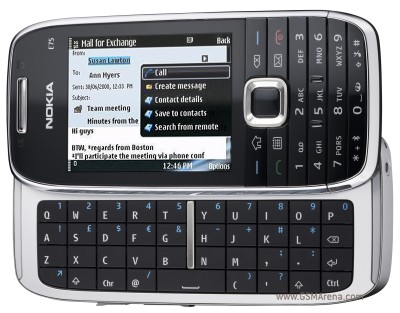
Nokia E75

So I got a Nokia E75. Great phone, with some awesome features. Except for two things; the battery life sucks, and some of the best features of the phone seem to be poorly implemented or executed.

To elaborate, the high-level feature set that I was interested in was

Sounds great, but what doesn't work ?

  • the 1-business day battery
  • the fact that the built in E-mail client doesn't understand Destinations, Nokia's implementation of access-point bonding (i.e. try WLAN A if its present, otherwise WLAN B if its present, and then as last resort, 3G)
  • the fact that the built-in accelerometer doesn't seem to work with the tap-to-silence feature
  • the stupid Vodafone firmware on it (which amongst other things disables the built-in Nokia SIP client

So, how to get around these things ?

  1. Go read this thread, and download the Internet telephony client
  2. Go and download Birdstep SmartConnect, which implements bonding correctly
  3. Charge the damn thing daily
  4. Change the firmware to make it a generic Nokia phone (haven't figured this one out yet)

I hope a new firmware upgrade comes out soon, because this is currently not that great. But it beats the pants off an iPhone, which, BTW, can't even do any of these things that are badly implemented.

Handy tip: I bought an application which I see as very important to me; Best Profiles auto-switches the phone profile to a silent one when I have a calendar entry, and changes it back when its scheduled to finish. Now that is useful!