Showing posts with label WiFi. Show all posts

Wednesday, December 27, 2017

VAST Networks

I am incredibly proud of the work my company, VAST Networks, has done. As the CTO, I am responsible for

  1. Continuously rearchitecting the network to deliver robust and varied services
  2. Deploying new hotspots
  3. Exploring and finding more efficient, cheaper and/or more scalable ways of deploying new hotspots
  4. Supporting and maintaining the hotspot locations
  5. Developing and keeping current products and overall network health


Our work over 2.5 years has resulted in us winning the Best Wi-Fi Service Provider in the World 2017, and Most Affordable Service Provider in the World 2017 as recognised by Wi-Fi Now. We were also shortlisted for Best Wireless Infrastructure in the World by the WBA, which we lost to Cisco. Not bad company to keep if you’re going to lose.


However, what I am most amazed by is the lack of interest in our local market in our products and/or services, when we seem to be smashing the lights in almost every metric that counts;

  • Page impressions
  • Unique visitors
  • Concurrent visitors
  • Session lengths / durations and repeat custom
  • Network throughput
  • Captive portal load times
  • Redundancy and resiliency of the network
  • Different on-boarding methods


Why is it that South African media and mobile companies haven’t woken up and exploited the network that is already there ? I am also convinced that local media/press only advertise companies or recognise innovation in success from people who advertise with them. Pathetic behaviour and so much for the “impartial tech press”.

Thursday, October 15, 2015

Open-Mesh MR900 & OM5P

Largebanner an

I like Open-Mesh’s equipment, and software update cycles (I have written about them before). The hardware is reasonably priced, the solution set keeps moving forward and for a small (relatively) deployment, the management dashboard is flexible, rich and frankly blows most enterprise solutions out the water with ease of management and access to information.


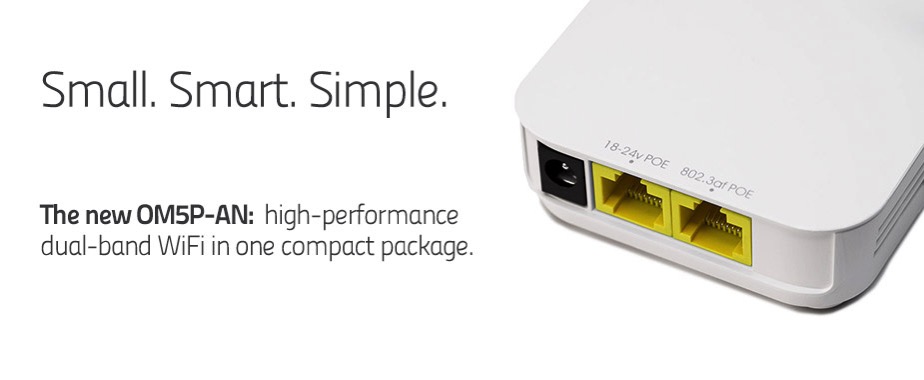
The OM5P is a 5GHz-only device, which I won’t discuss because its been deprecated by the OM5P-AN. Thanks for releasing this; I managed to buy 3 in the short window when it was available, and it was a poor performer. Not a good purchase at all.


The MR900 on the other hand is a pretty awesome device. 802.11n in 2.4 and 5GHz, in a single device, and fairly priced. Robust, good radio performance, and pretty easy to setup/maintain. It too had been replaced by the MR1750, essentially an ac device in 2.4 and 5GHz. I have a few on back-order, so look forward to testing that.


But, Open-Mesh solves a problem and its cloud controller Cloudtrax solve a pretty simple set of problems;


  1. Relatively cheap AP’s, that work relatively well from a radio/RF perspective
  2. AP’s can be wired or meshed, and require no configuration to configure them in either mode
  3. A web-based management console, that provides sufficient control but simplistically
  4. The ability to run 4 SSID’s, inter-mixing rate limiting, client isolation and ability to not bridge to the LAN solve the networking issues
  5. The ability to run mixed authentication modes, external RADIUS and captive portal, PayPal and Facebook integration and flexible deployment modes
  6. Pre-built rich protocol-level, client-level and SSID-level traffic graphs that require zero configuration


I can highly recommend Open-Mesh.

Monday, October 12, 2015

Libratone Zipp speaker

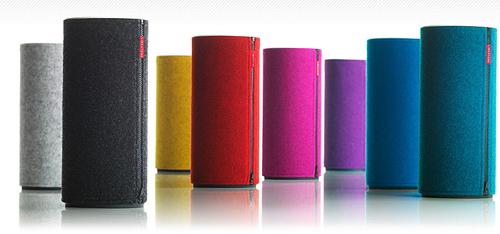
Libratone Zipp

Multi-room, mostly wire-free audio is a hassle. And its almost never seamless.


A breed of Apple Airplay-compatible speakers has been around for a while, but they all tended to be quite ugly. I ended up liking the styling of the Libratone Zipp; classic Danish design, good reviews, solid sound from a wireless speaker with Airplay and Bluetooth built-in - sounds ideal!


Its not cheap; $320. And I’m sorry to say, its rubbish.


  • Pairing it over WiFi is a disaster (can’t see the network, struggle to associate), and generally requires you to reset the speaker if you change the SSID or password
  • The WiFi chip must be encased in solid lead, because even if its right next to the AP, it can’t connect
  • Who builds a WiFi speaker that only has a 2.4GHz chip in it ?
  • The audio quality is iffy at best, and is generally not memorable
  • When you do miraculously get it powered, associated and playing music, it hardly goes 5 minutes without cutting out and requiring you to power it off and on again
 

On the positive side, its pretty, and the Bluetooth works well - but then I would have bought something else and saved $100. Sigh.


I am trying hard not to get into the Sonus ecosystem, but they’ve been around for a while, and it must be because they do things properly.


PS. Please don’t point to my WiFi network. I have RRD graphs that prove coverage and connection-rate density where the speaker was placed, tested and moved around are good

Tuesday, January 13, 2015

Xclaim Xi-3

IecvNGm6phjHhMy

Enterprise and carrier WiFi have a few, established players with a shopping list of features that are useful;

  • Wireless mesh (don’t need all AP’s wired to each other)
    • Resiliency / self-healing if one or more break and the network re-routes
  • Multiple AP’s presenting a single SSID
    • Roaming between AP’s with no disruption to connectivity
    • Low inter-AP handover latency
  • Service profile / SLA’s per application
  • Rate-limiting (overall, and per application)
  • Usage stats / graphs
  • Multiple SSID’s
  • High-speed / throughput and support for the less congested 5GHz band (either 802.11a, 802.11n or 802.11ac)


Offerings for home use were pretty limited, and consisted primarily of features that were quite unnecessary (SPI firewalls, port forwarding, etc), or plain didn’t work properly (who reading this has ever managed to get a WDS network going between the same manufacturer, never mind a mix of them or generational differences).


Meraki promised some of this at a lower price-point pre acquisition, but Cisco in typical fashion has completely screwed up this SME and/or consumer-orientated acquisition; their price points alone make them a non-contender for anything other than an enterprise (which makes you wonder why they bought them if they’re not busy integrating their controller-less architecture into their incumbent line).


Modern homes need much of the above; the only thing that really radically differs is the number of AP’s. The average home needs less than 5 (note, I said home not ranch); the average enterprise I’d argue needs significantly more. Until recently, I could only wholeheartedly recommend the Open-Mesh range of products because they meet all of the above requirements, and their new software updates bring some truly incredible features to an AP range that is still less than $100 an AP. Facebook social WiFi integration, per application bandwidth reporting across SSID’s and a newly enhanced mobile app make the Open-Mesh ecosystem truly compelling, and hard to beat.


Enter Ruckus Wireless’ attempt, the Xclaim range. A new name and brand, and positioned differently, Xclaim attempts to give customers looking for a solution from a RF-credible provider a lower price-point for some of those features. I ordered 4 of the Xi-3 units, and have also played with a Xi-2 unit (provided by Xclaim); the units differ on their support for 802.11ac. Of the features outlined above, these AP’s do not mesh.


Ruckus is a company I admire; they have great people, their products are liked by serious WiFi deployers for their performance, throughput and manageability and they’re significantly more responsive to their customers and channel. This is the type of vendor I like. But, I’m afraid with the Xclaim range, they released about 6 months too early.


One of the selling points of the Xclaim products is that you configure the AP’s via an iOS or Android app. The app itself, on initial usage, is easy to use and beautiful. And the graphs / usage stats that appear are very pretty and useful for a home or SME. But once you close the app, the wheels fall off the bus. If you launch the app again, the graphs don’t appear (if you can even connect to the AP). If you want to add an AP, its a hit/miss affair. The network settings are tied to that app installation. If you can’t connect to the AP, or you want to add another AP, you have to remove the app from your device, reset the AP, and reconfigure the network (from scratch).


If you want to deploy in another environment / location, you have to remove the app, reinstall it and go again. And if you want to manage your initial / other site ? Reinstall the app, reset the AP(s), rinse, repeat. Another site ? Rinse, repeat. This is a massive fail.


No matter how good the RF performance of these units is (and by all my testing over the last month, it is truly impressive), managing them is a complete nightmare for a single site with a single AP. And for multiple sites and/or multiple AP’s, its completely unusable. Pity. I’m hoping they put the right resources behind this product line and fix it up; right now, its not something I could recommend.

Tuesday, June 10, 2014

Using Republic Wireless

Rw

I love the theory of using WiFi as a de facto bearer for voice telephony, with seamless integration and handover to a macro network. The promise of a voice telephony service that utilises WiFi locally, and cellular as a macro network service, is appealing; combined with seamless handover between the mediums and it sounds utopian. Costs should be lower, but more importantly, call quality and reliability should be higher; the carrier could offer SLA’s on calls made on a WiFi bearer, introduce features like HD voice and network core call recording relatively easily and make use of the ever increasing pool of latent capacity on networks, broadband or otherwise.


These sound like enterprise features. It sounds like this category is begging to be made. But until someone steps up to the challenge, we have to work with what is in-market right now; that is consumer-grade, and appeals to cost as the primary driver. And that is where Republic Wireless plays.


Its been hard to separate the three interwoven threads of the service; there is the Sprint-provided cellular service, the Moto G handset and the Republic Wireless MVNO service. Lets try though.


Moto G - This is an awesome device for its price point. The hardware is not the most top end, and it noticeably struggles if you push it even vaguely. The battery life is pretty decent (looks like I could get almost two days out of it), the screen is pretty good quality and overall it feels great in the hand. Other than those points, its a relatively new version of Android (4.4.2), and you can make it look, feel and behave exactly as you see fit.


Republic Wireless MVNO - The service experience of using Republic has been pretty awesome. I haven’t once resorted to phoning (good thing, because there is no number to phone), and the entire order and fulfilment process was carried out seamlessly, efficiently and electronically, including porting in a phone number from another carrier. I was kept constantly informed as per the order progress and status, as well as delivery. The user portal is mostly functional (giving you a list of in/out calls, and a bearer breakdown), but could do with some more functionality (like setting your forwards, being able to playback your voicemail, etc). It works though. I changed service plans from WiFi-only to WiFi and cellular in a matter of minutes through their pre-loaded application, a process that normally would require a phone call and three forms. Handover between WiFi and cellular is actually pretty good, and kudos to Republic for not loading the phone with tons of bloat. Its almost completely untouched.


Sprint - This is the least tested part of my experience thus far with Republic; but its also most evidently the annoying part. When on cellular, call setup times are long, call quality is not great, and successful call setup is average to poor. When using the phone this weekend, 2 out of 3 call setups in a mall failed. When the same recipient was called from another cellular service (AT&T) the call setup time was near instant (and they’re not on the same network) and all were successfully terminated / answered. I cannot comment on coverage, as I haven’t left San Francisco with it yet. Its not fair to comment on the data side of the service, as I chose the 3G service and not the fancy 4G service (rant : why do US carriers neglect or not bother with their 3G services and instead go full tilt with LTE deployment). Its also entirely possible that Republic chose a choked cellular data service to keep the price low. I therefore cannot comment on the data side.


From a costing perspective, this is available for easily half of T-Mobile’s rates, which themselves are, at minimum, 30% cheaper than “mainstream” options (AT&T and Verizon). If I was a consumer, and wanted cellular service, this would be a pretty easy de facto choice; save easily $50 per month, and support an exciting challenger (although it looks like the area is starting to hop up; check out FreedomPop). As a relatively heavy business user however, this doesn’t work as my primary option. Its let down by Sprint’s network. Pity.

Friday, June 6, 2014

Republic Wireless

IMG 2240

I had all but forgotten about Republic Wireless, until upcoming travel plans made me realise that I needed to be able to reliably make WiFi calls. So I hopped onto their web site and ordered their entry level phone, a Motorola G. Guess what arrived today :-)


More comments about the experience, service and device next week. Now its the fun of setting up a new Android device.

IMG 2241

Monday, September 9, 2013

Google Voice

Google Voice Logo

Call aggregation or simultaneous ring are possible if your carrier plays nicely. Most don't; I'm not sure why, but I'm not familiar with too many companies who have this at the core of their value proposition.


Google Voice does offer this; formerly known as GrandCentral, the service allows you to present a single number, which

  • can receive text messages (SMS) and deliver them to all the capable devices and/or e-mail
  • can receive voice calls, and ring multiple devices allowing you to answer the call on the most convenient one
  • switch from one phone to another mid-call, as well as record calls
  • provides a single voicemail service, which can forward the voice message via e-mail and transcribe it to text
 
In addition, it allows you to make international calls at lower rates, as a pseudo calling card / VoIP service. I've installed it and will start using it actively, if only to mask my true mobile number and allow for a single voicemail across office and desk phones.

Saturday, March 9, 2013

Open-Mesh

I've played with a load of WiFi access points; from my very first Zyxel 802.11b access point, with its dorky associated PCMCIA card, to the latest/greatest Apple base station, most AP's haven't really differentiated themselves. Off hand, I can think of Proxim, Cisco, Orinoco, Xirrus, Colubris, Ruckus, Linksys, Netgear, Billion, D-Link, TP-Link & Belkin to name a few brands I've had the (dis)pleasure of directly configuring.

 Only four stand out, for different reasons.

  • Proxim, for having the most awesome WiFi meshing, going back more than 8 years. Although you had to connect to each one to configure them, wired or wireless was irrelevant; they would discover each other and backhaul over 5GHz and serve clients over 2GHz, with a single unified SSID. They were almost perfect, except for the price, which was about R5k at the time
  • Linksys, for having the most long-range device, the WAG54G. Solid, dependable, boring as sin but rock solid and worked well in almost any environment
  • Billion, for unarguably having the most rubbish radios and range, and being so unreliable that they're as good as useless
  • Apple, for having the most expensive and least functional devices on the planet. Other than that you can configure them from an iOS device, there is absolutely nothing redeeming about these AP's. Repeat, there is nothing redeeming about Apple AP's as WiFi devices
So, being a schmuck, I ended up with two Apple Airport Extreme devices, both cabled/wired, with two radios; one broadcasting at 5GHz and the other at 2.4GHz. Nope, they didn't speak to each other if they were cabled. Nope, they didn't form/create one SSID. Yes, iOS devices are particularly stupid and want to associate with the BSSID they last connected, not necessarily the one closest.
 
So, we had what I call the last shining light problem; the last AP the client device connected to, was the one it insisted on connecting to again. Even if there was a closer, faster AP in the same room. With the same SSID. This illustrated to me that you can't leave AP decisions to the client; work on the principle that clients are stupid (gosh, that would be a first!), and leave the intelligence in the network.
 
One evening, this happened once too many times and I got super annoyed. Quick Google search revealed that what I want to do is surprisingly difficult in the consumer space, and pretty rare even in the enterprise space. What I wanted is referred to as wired open or loose mesh; a mixture of wired and wireless AP's, that communicate with each other, and where an associated AP will kick a client off when a "closer" AP sees the client.
 
A quick call to Ruckus indicated they can absolutely do what I want; but at a price point I wasn't willing to pay for home. Meraki (now a Cisco division) seem to be able to do what I want, but again, at a price point that seems to be straying quite far from their original roots. I was about to give up, and then discovered Open-Mesh. 
Seemed ideal; cheap AP's ($60 and $80), cloud-based controller, two SSID's out the box, perfect! Also cheap enough to experiment, so I ordered four. Two were to be wired, two wireless. I expected four would be enough. The first awesome thing was that they told me the MAC addresses of the devices, before they shipped! Excellent, means I could add it to my DHCP-issuing infrastructure, as well as configuring it online, on the Cloudtrax portal. You create a master login, and from there, you can create multiple "child" networks each with their own independent settings.
 
And before you think you're locked into their AP's, essentially any AP running batman can join and be part of the network.
 
So how do you configure ? There are three high level decisions;
 
  1. Do you want to allow guests (i.e. an open network), and if so, what do you want to limit their traffic to ?
  2. Do you want to allow guests to have a premium service ? If so, what are your Paypal details and what rate limit would you like them to have ?
  3. Do you want to run a 2nd "private" SSID and bridge it to your LAN ?
 
There are a bunch of other decisions, like AP isolation (i.e WiFi clients cannot connect to each other), the ability to report outages via e-mail, but functionally, you have to determine the above 3. I configured the devices, by basically adding them to my network on a Google-backed map with their MAC's (which I had because they gave them to me), and waited.
 
They arrived, I plugged them in, and 15 minutes later, I had a meshed WiFi network that had two wired AP's, and two additional AP's hanging off them. As promised, network coverage was excellent and more importantly, I could roam from one AP to another with no dropped packets, a slight increase in latency and the ability to review my network from Android or iOS. I've ordered some additional AP's to ensure 150Mbps in every corner of the house, but basically, you could get away with 4 on a two story house for Internet access.
 
There is no longer a last connected light problem, there is now a shining light network; the closest AP is associated to, network access is full strength and the network is fault-tolerant.
 
I can highly recommend this service!
Edit: you don't need to tell the devices or network which one is cabled or not, which port is LAN/WAN; it figures it out dynamically.
Edit: it creates a virtual BSSID, and then dynamically remaps the closest AP to a client with that BSSID. It also creates its own DHCP range and NAT's on the guest network, and prevents clients on the guest network access to the LAN.
Edit: I've added three more nodes to the network, and it is highly extensible; here is a view of my home network.
Mynetwork